Why nas data storage devices beat scattered drives and cloud-only storage
Most of us (especially 18–50-year-olds who live on phones + laptops) store photos and files in a messy blend of phone storage, a computer, one external drive, and a cloud plan we swear we’ll “organize later.” It works—until a device dies, a folder gets deleted, or you simply run out of space.
NAS data storage devices (NAS = network-attached storage) solve a very specific everyday problem:
They give you one “home base” for files that every device can reach on your network. UGREEN even markets NAS as a way to avoid subscription fees and keep storage privacy/control in your own hands.
A quick analogy
Cloud storage is renting a storage unit—convenient, but there’s ongoing rent, and you live by the provider’s rules. NAS data storage devices are like adding a locked closet in your home that the whole family (or a small team) can use, with separate “keys” (permissions) for each person.
NAS backup strategy: the 3-2-1 rule in plain English
A NAS is awesome, but it’s not a backup strategy by itself. The classic beginner mistake is assuming “RAID = backup.”
A simple baseline is the 3-2-1 backup rule: keep 3 copies of important data on 2 different media/types, with 1 copy off-site.
Why this matters now: ransomware is still a huge driver of real-world data loss. In Verizon’s 2025 DBIR briefing deck, ransomware was present in 44% of reviewed breaches (up from 32%).
Where NAS data storage devices fit:
- Your NAS becomes the “always-on” second copy for NAS storage backup (phones + PCs auto-backup to it).
- Your off-site copy can be a smaller cloud plan or an external drive stored somewhere else.
Cloud still has a place—especially for off-site safety. For example, Apple lists iCloud+ 2TB at $9.99/month in the US, and Google One lists 2TB at $9.99/month as well (pricing can change).
At $9.99/month, that’s about $359.64 over 3 years and $599.40 over 5 years—so NAS data storage devices can pay off over time if you’re using the cloud mainly as a big “photo vault” while still keeping a smaller cloud tier for off-site protection.
UGREEN NASync DH4300 Plus: a beginner-friendly “personal cloud” NAS
If you’re shopping for NAS data storage devices and want something that feels modern (fast networking, easy apps, photo-focused), the UGREEN NASync DH4300 Plus hits a sweet spot for first-time buyers.
Here are the core specs from UGREEN’s product page:
- 4-bay SATA NAS, with 120TB max raw capacity (4×30TB).
- 8-core Rockchip ARM CPU (A76 + A55, 2.0 GHz).
- 8GB LPDDR4X RAM + 32GB eMMC (system storage).
- 1× 2.5GbE networking and 4K 60Hz HDMI.
- RAID modes: JBOD/Basic/RAID 0/1/5/6/10.
- Published power: 22.89W drive access / 7.23W hibernation (enclosure figures).
UGREEN also emphasizes “personal cloud” UX features like remote access, NFC quick connect, an AI photo album, and 2FA support on the platform.
Pricing moves around, but the UGREEN store lists the diskless unit at $399.99 (and reviewers have positioned it in the “under $400” budget class).
You’ll also see the same positioning echoed in major retailer listings (useful for “sanity checking” specs): product titles on Amazon and Microless highlight 120TB capacity, remote access, AI photo album, 8GB LPDDR4X RAM, 2.5 GbE, and 4K HDMI.
A lot of buyers also rely on video reviews before choosing among NAS data storage devices; one YouTube reviewer even framed the DH4300 Plus as a top “budget NAS” pick (claims vary by reviewer).


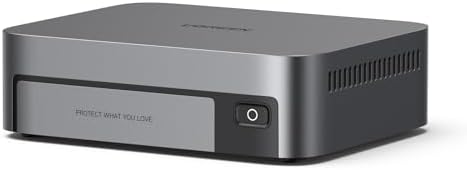
[AFFILIATE LINK PLACEHOLDER: UGREEN NASync DH4300 Plus]
The honest tradeoffs
No NAS is perfect. TechRadar’s review calls the DH4300 Plus a budget-friendly four-bay NAS for home/small business, but notes limits like non-expandable RAM (capped at 8GB) and missing features like M.2 SSD support or dual LAN ports that some competitors offer.
So I treat it as a “private cloud + backup hub” first and a “home lab server” second—exactly the lane where NAS data storage devices are most useful for everyday households.

- Entry-level NAS Home Storage: The UGREEN NAS DH4300 Plus is an entry-level 4-bay NAS that’s ideal for home media and vas…
- 120TB Massive Capacity Embraces Your Overwhelming Data: The NAS offers enough room for your digital life, no more deleti…
- User-Friendly App & Easy to Use: Connect quickly via NFC, set up simply and share files fast on Windows, macOS, Android,…
Comparison: UGREEN vs Synology vs MetaBox vs other best sellers
When people compare nas data storage devices, they’re usually trading off three things: software maturity, hardware features, and upgrade runway.
| Model | What it’s best at | Key watch-outs |
|---|---|---|
| UGREEN NASync DH4300 Plus (4-bay) | Beginner-friendly “private cloud,” 2.5GbE value, photo-centric features | Single 2.5GbE port; ARM platform, and no M.2 per TechRadar |
| Synology DS423+ (4-bay) | DSM ecosystem + built-in backup/collaboration tools | 1GbE networking (2 ports) and reviewers call out lack of 2.5GbE |
| Synology DS923+ (4-bay) | Longer upgrade runway (ECC RAM, M.2 slots, optional 10GbE module) | Still 1GbE by default; upgrades cost extra |
| QNAP TS-464 (4-bay) | Feature-heavy hardware: 2×2.5GbE, M.2 slots, HDMI, PCIe expandability | More knobs = more setup decisions; OS ecosystem differs from Synology. |
| ORICO MetaBox HS200-Pro (“MetaBox”) | Compact/creative-friendly mix of SATA + NVMe, 2×2.5GbE, published shipping/warranty info | 2-bay SATA for main storage limits raw capacity vs 4-bay boxes. |


How I’d pick:
- If you want the most established “apps-first” NAS experience, Synology DSM is a strong reason people stick with DS-series boxes.
- If you want the most hardware features per dollar (2×2.5GbE + M.2 + HDMI), QNAP’s TS-464 spec sheet is hard to ignore.
- If you want a simpler on-ramp with 2.5 GbE and a photo/remote-access focus, NAS data storage devices like the DH4300 Plus are designed for that “first NAS” moment.
Buying, upgrading, service, and delivery | what to research
If you want nas data storage devices to feel like an upgrade (not a headache), research these before you buy.
Drive compatibility and support policies matter:
Synology’s DS423+ datasheet warns that non-validated drives/components may limit functionality and even lead to instability or data loss, and Synology also separately defines “New Product” warranty coverage around purchases from authorized distributors/resellers.
Synology drive policies have also been under scrutiny, with reporting that newer Plus-series models can require Synology-branded drives or curated compatibility lists.
Networking is the silent budget item. If you buy 2.5GbE NAS data storage devices, budget for a 2.5GbE switch/router and a 2.5GbE adapter on at least your main workstation.
Service and delivery checklist (new purchases):
- UGREEN advertises 2-year warranty and 30-day returns on its store listing.
- The Synology DS923+ lists a 3-year warranty in its datasheet (extendable in some markets).
- ORICO publishes estimated delivery windows (e.g., 5–14 business days) and warranty/returns on its MetaBox page.
eBay risk factors
Used deals can be great, but the risk profile is real:
- warranty uncertainty (missing proof of purchase/authorized channel),
- counterfeit/misrepresented items on resale marketplaces,
- and shipping damage—Seagate explicitly calls out ESD/shipping protection like using antistatic/ESD bags.
eBay’s Money Back Guarantee can help in eligible cases, but it’s not a substitute for careful shopping.
FAQ + WordPress tags + keyword density notes
FAQ
Is a NAS the same as cloud data storage?
No. Cloud data storage lives in a provider’s data center; NAS data storage devices live with you. Many people use both: NAS for ownership and fast local access and the cloud for off-site backup redundancy.
Is RAID a backup?
No—RAID helps with drive failure, not deletion/ransomware. For NAS data storage devices, RAID is one layer, not the whole plan—use 3-2-1.
Which is easier: Synology or UGREE?
Synology’s strength is DSM apps and workflows; UGREEN’s DH4300 Plus is positioned as a beginner-friendly private cloud with 2.5GbE value.
Can I buy a NAS on eBay safely?
Sometimes—just treat it like buying used electronics: verify history, use platform protection, and be careful with storage and shipping/packaging.
WordPress tags (suggested)
nas storage backup, private cloud storage, ugreen nasync dh4300 plus, synology diskstation, orico metabox, qnap TS-464, home file server, photo backup, cloud storage alternative, 2.5 GbE
Keyword density note
If you paste your finalized version back here, I can compute your exact density and suggest 2–4 natural spots to add. NAS data storage devices” to land near ~1% without stuffing.